Notebook, Excel, or App? Comparing Ways to Track Expenses
Notebooks are honest but easy to abandon. Excel is powerful but painful on a phone. Here's an honest comparison of the three real ways people track daily expenses in India.
If you’ve decided tracking your expenses is worth doing, the next question is how. In practice, almost everyone ends up trying one of three methods, usually in this order: a notebook, a spreadsheet, and eventually an app. Each has a real, honest trade-off — here’s what actually happens with each one.
Method 1: The notebook
This is where most people start, often because a parent or grandparent did it this way. It’s simple, requires no technology, and there’s something satisfying about physically writing down a number.
What works: No app to figure out, no battery to worry about, nothing to learn. You can start today with a pen.
What doesn’t: You have to physically have the notebook with you at the moment of spending — and most people don’t carry one around all day. Totalling a month’s spending means manually adding up rows, which very few people actually do consistently. And there’s no way to see patterns — a notebook shows you what you spent, never how it breaks down by category or how this month compares to last month without a lot of manual re-work.
Method 2: The spreadsheet
The natural next step for anyone comfortable with Excel or Google Sheets. It’s genuinely powerful — you can build formulas, category totals, even charts.
What works: Full control. You can build exactly the categories and views you want, and totals update automatically once you’ve entered the data.
What doesn’t: Entering data is the problem, not the sheet itself. Typing into a spreadsheet on a phone — the device you actually have with you when you spend money — is slow and fiddly: tapping tiny cells, switching between the number pad and the keyboard for category names, scrolling to find the right row. Most people who start a spending spreadsheet keep it going for a few weeks, then quietly stop updating it once life gets busy, because the friction of opening a full spreadsheet app just to log a ₹40 chai is too high for how small the expense feels in the moment.
💡 Aha moment
Both the notebook and the spreadsheet fail for the same underlying reason — not because they're bad tools, but because the device you carry everywhere (your phone) isn't built for either of them. The device that's always in your pocket at the exact moment you spend money should be the one you log the expense on, in as few taps as possible. That single insight is really the whole case for a dedicated mobile app.
Method 3: A dedicated expense-tracking app
This is where most people eventually land — but not all apps are the same, and it’s worth being specific about what “a good one” should actually do.
A genuinely useful expense-tracking app needs to solve the exact friction problems that killed the notebook and the spreadsheet:
- Logging has to take seconds, not a minute. If opening the app and entering an expense takes longer than remembering to do it later, you’ll skip it, exactly like the spreadsheet.
- Categorising has to be near-instant. Typing “Uber” and getting it correctly filed under Transportation, without manually picking from a long dropdown every time, is what makes daily logging sustainable.
- It has to actually show you patterns, not just a running list — category breakdowns, month-over-month comparisons, spending by day of the week — the things a notebook or an under-maintained spreadsheet never quite gets around to showing you.
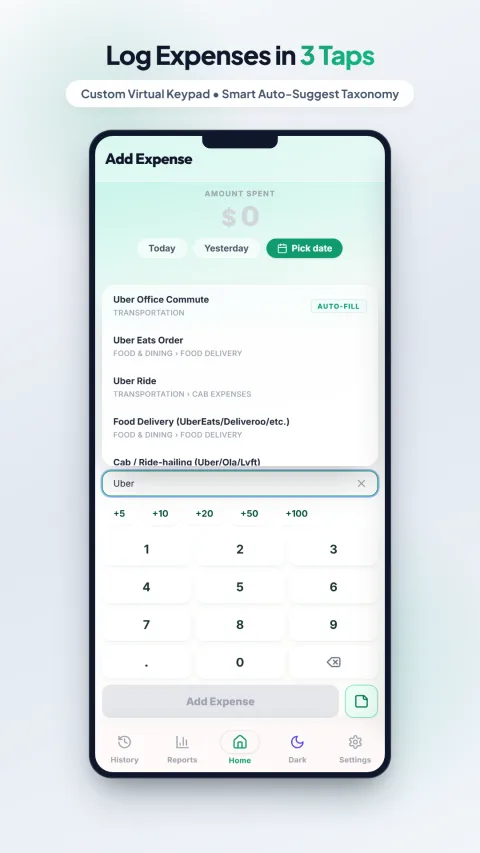
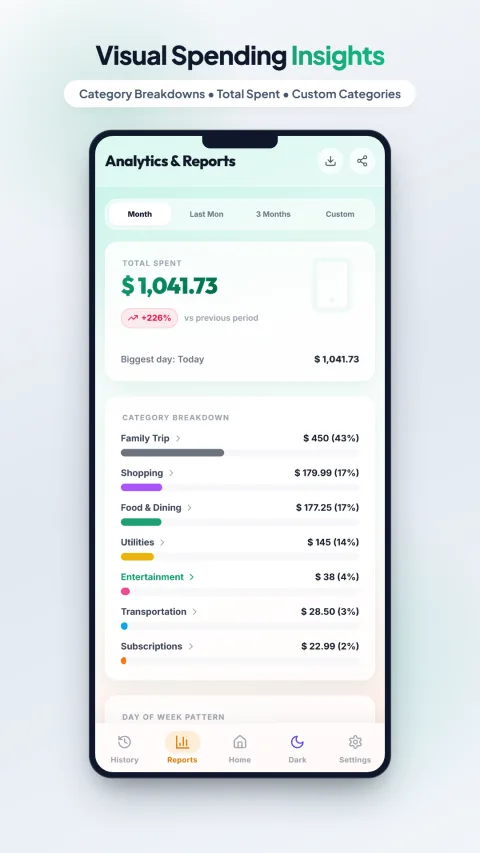
Typing "Uber" instantly surfaces the right category — no manual dropdown hunting, no typing the full expense name.
That’s the specific gap My Expenses Tracker was built to close — a custom keypad built for logging amounts fast, and smart category search so you never have to scroll a long list to find “Transportation.” It’s also fully offline and stores everything locally on your device, rather than a cloud account you have to set up before you can even log your first expense.
Full disclosure
Skip the notebook and the spreadsheet — try My Expenses Tracker
Free, 100% private, fully offline. No account, no signup, your data never leaves your phone.
Which one is actually right for you?
Honestly — whichever one you’ll actually keep using past week one. If you genuinely enjoy the ritual of a notebook and will stick with it, that beats an app you abandon. If you love building your own spreadsheet formulas and will maintain the discipline, that’s a real, valid choice too. But if you’ve tried both and quietly stopped a few weeks in (which is the most common outcome, based on how most people actually behave), a purpose-built app that removes the friction is worth trying — that’s the whole reason one exists.
Learn more from official sources
- Reserve Bank of India — Financial Literacy — general guidance on household budgeting.
This is general information, not personalised financial advice. My Expenses Tracker is a free app built by the same person behind this website — disclosed here for transparency, not as a sponsored placement.